Neovim
Neovim is a Vim-based text editor focused on extensibility, modern terminal features, Lua configuration, built-in LSP support, and plugin-driven workflows. In this setup it is the main terminal editor for editing code and dotfiles.
Why it matters
Neovim makes editing fast without leaving the terminal. This reduces context switching between terminal, editor, search tools, and Git workflows.
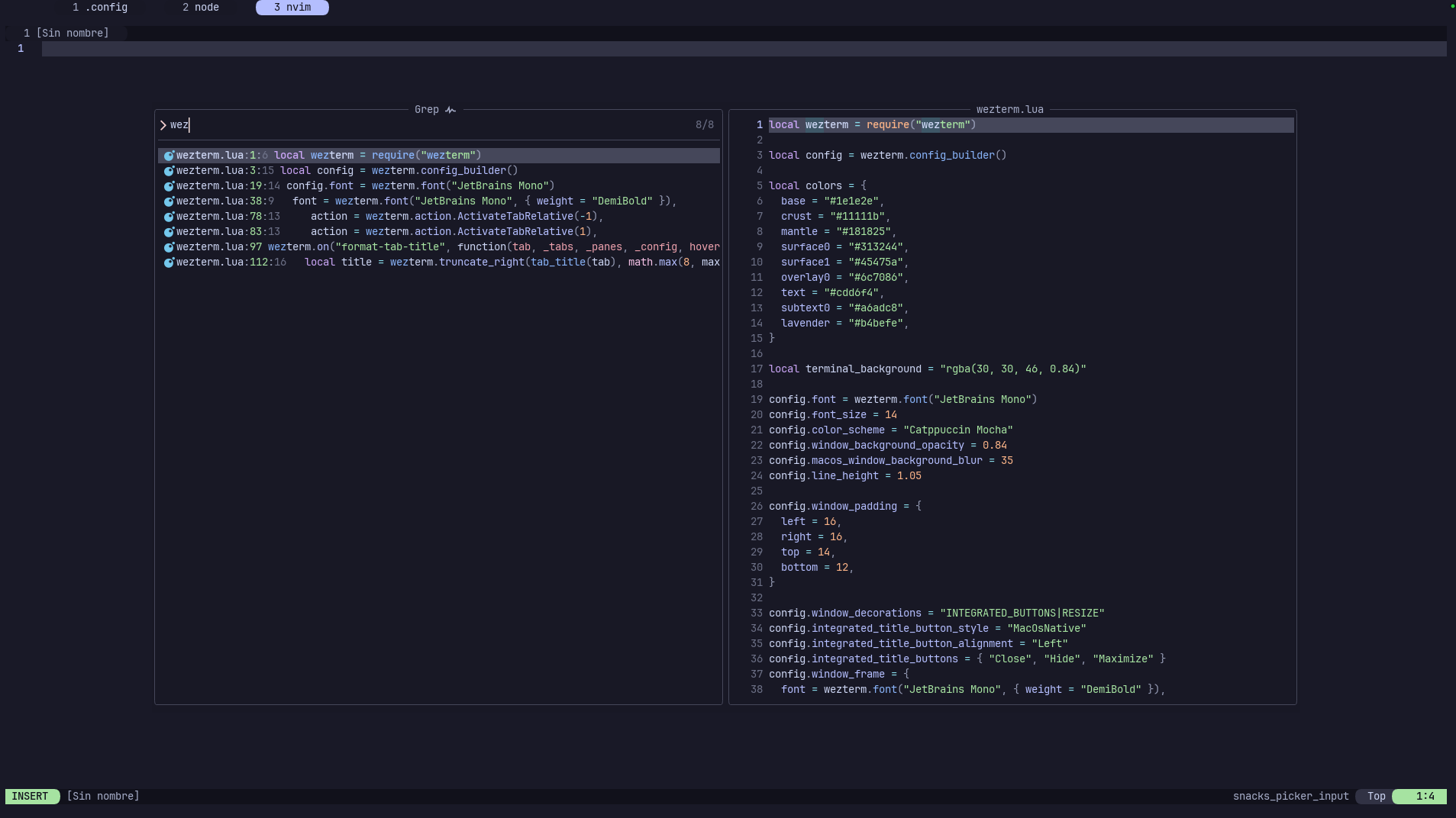
Configuration file:
nvim/.config/nvim/init.luaRequirements:
Neovim 0.10 or newer
Git for lazy.nvim plugin installation
ripgrep for Space f g
JetBrainsMono Nerd Font for icons
Official Resources
| Resource | URL |
|---|---|
| Website | neovim.io |
| Documentation | neovim.io/doc |
| GitHub | github.com/neovim/neovim |
What It Is Used For Here
| Use | Notes |
|---|---|
| Editing code | Fast keyboard-first editor inside the terminal. |
| Editing dotfiles | Main editor for this repository's config and docs. |
| Project search | Uses Snacks picker for files, text, and buffers. |
| Lua configuration | The setup lives in init.lua and is managed with lazy.nvim. |
Problems It Solves
| Problem | Solution in this setup |
|---|---|
| Finding files manually is slow. | Space f f opens a file picker. |
| Searching text from the shell breaks flow. | Space f g searches inside the project. |
| Open buffers are hard to track. | Custom tabline plus Space f b make buffers visible and searchable. |
| Editor setup is hard to reproduce. | The config is versioned in nvim/.config/nvim/init.lua. |
First Steps
Open Neovim:
nvimOpen the dotfiles project:
cd ~/.config/dotfiles
nvim .
Use these first:
Space f f   find files
Space f g   search text
i           insert text
Esc         return to normal mode
:w          save
:q          quit
Leader Key
| Key | Meaning |
|---|---|
Space | Leader key |
Daily Usage
| Command | Action |
|---|---|
i | Enter insert mode before the cursor |
Esc | Return to normal mode |
Space f f | Search files |
Space f g | Search text in the project |
Space f b | Search open buffers |
:w | Save |
:q | Quit the current window |
:q! | Quit without saving |
:wq | Save and quit |
/text | Search forward for text |
n | Go to the next search result |
N | Go to the previous search result |
u | Undo |
Ctrl r | Redo |
dd | Delete current line |
yy | Copy current line |
p | Paste after the cursor |
:bd | Close current buffer |
Custom Shortcuts
| Shortcut | Mode | Action |
|---|---|---|
Space f f | Normal | Search files with Snacks picker |
Space f g | Normal | Search text with Snacks grep |
Space f b | Normal | Search open buffers with Snacks picker |
These are the only custom Neovim key mappings currently defined by this project. The remaining commands on this page are standard Neovim commands or defaults provided by the installed plugins.
Using The Pickers
- Press
Escto make sure Neovim is in normal mode. - Open a picker with
Space f f,Space f g, orSpace f b. - Type to filter the results.
- Move through the list with the arrow keys.
- Press
Enterto open the selected result. - Press
Escto close the picker without selecting anything.
Space f g searches file contents from the current working directory. Start Neovim from the project root when you want the search to cover the whole project:
cd path/to/project
nvim .
Common Shortcuts
Modes
| Shortcut | Action |
|---|---|
Esc | Return to normal mode |
i | Insert before cursor |
a | Insert after cursor |
o | Open a new line below and enter insert mode |
v | Enter visual mode |
V | Enter visual line mode |
Files
| Command | Action |
|---|---|
:w | Save file |
:q | Quit current window |
:q! | Quit without saving |
:wq | Save and quit |
:e path/to/file | Open file |
Editing
| Shortcut | Action |
|---|---|
u | Undo |
Ctrl r | Redo |
yy | Copy current line |
p | Paste after cursor |
dd | Delete current line |
/text | Search forward |
n | Next search result |
N | Previous search result |
Buffers
| Command | Action |
|---|---|
:bn | Next buffer |
:bp | Previous buffer |
:bd | Close current buffer |
Space f b | Search buffers with Snacks picker |
UI
| Area | Configuration |
|---|---|
| Theme | Catppuccin Mocha |
| Background | Transparent |
| Line numbers | Absolute and relative numbers enabled |
| Mouse | Enabled |
| Search | Ignore case unless uppercase is used |
| Statusline | Lualine |
| Tabline | Custom WezTerm-style buffer tabline |
Configured Editor Behavior
| Option | Value | Effect |
|---|---|---|
| Leader key | Space | Starts project-specific shortcuts. |
| Line numbers | Absolute and relative | The current line shows its number; other lines show jump distance. |
| Mouse | Enabled | Allows selection, scrolling, and clicking UI elements. |
| True color | Enabled | Lets Catppuccin render its full terminal palette. |
| Search case | Smart | Lowercase searches ignore case; uppercase searches become case-sensitive. |
| Cursor line | Enabled | Highlights the row containing the cursor. |
| Sign column | Always visible | Prevents text shifting when diagnostics or Git signs appear. |
| Statusline | One global line | Lualine spans the complete Neovim window. |
| Tabline | Always visible | Open listed buffers remain visible at the top. |
| Command height | 0 | Hides the command area until Neovim needs it. |
| Popup transparency | 12 | Slightly blends completion and popup menus with the terminal. |
The custom fill characters replace default separators with Powerline and box drawing glyphs. They require the Nerd Font configured in WezTerm.
Statusline And Buffer Line
The bottom Lualine statusline displays:
| Position | Information |
|---|---|
| Left | Current mode, Git branch, and Git diff summary. |
| Centre | File path and modified/read-only state. |
| Right | Diagnostics, file type, progress through the file, and cursor location. |
The top line is a list of buffers, not Vim tab pages. Each item shows a one-based index and filename. The current buffer is lavender, inactive buffers are dark, and unsaved buffers include +.
Buffers, windows, and tabs
A buffer is an open file. A window is a viewport showing a buffer. A Vim tab is a collection of windows. This setup deliberately uses the top line for buffers because that maps more closely to the tabs people expect from other editors.
Plugins
| Plugin | Purpose |
|---|---|
folke/lazy.nvim | Plugin manager |
catppuccin/nvim | Theme |
echasnovski/mini.icons | Icons |
folke/snacks.nvim | Picker and search UI |
nvim-lualine/lualine.nvim | Statusline |
Plugin versions are pinned in nvim/.config/nvim/lazy-lock.json. This makes a new installation reproduce the tested plugin revisions rather than silently using unrelated newer versions.
Useful plugin maintenance commands:
| Command | Purpose |
|---|---|
:Lazy | Open the lazy.nvim plugin manager. |
:Lazy sync | Install missing plugins, update, and remove unused plugins. |
:Lazy restore | Return plugins to the revisions in lazy-lock.json. |
:checkhealth | Run Neovim and plugin diagnostics. |
What Is Not Configured
This repository does not currently configure language servers, completion engines, formatters, debuggers, or Treesitter parsers. The editor provides the documented navigation, search, theme, buffers, and statusline without assuming a particular programming language.
Notes
The tabline shows listed buffers, not Vim tabs. Modified buffers get a + marker in the tab title.
On first launch, lazy.nvim is cloned and installs the versions pinned in lazy-lock.json. This requires internet access. Run :checkhealth if plugins do not load, and confirm rg --version if project grep fails.
Vim modes
Neovim is modal. Most commands run from normal mode. If a shortcut does not work, press Esc first and try again.